

How Adobe Is Transforming Creative Workflows With Artificial Intelligence
Adobe is bringing artificial intelligence into more of its creative products, making it easier for designers, photographers, and video editors to complete their work. At Adobe MAX 2026 in Miami, the company announced several new features across Photoshop, Premiere Pro, Illustrator, InDesign, and Firefly.
One of the biggest announcements is its plan to let third-party AI assistants work directly with creative applications through local Model Context Protocol (MCP) integrations. This could make creative work more flexible by allowing users to combine their preferred AI assistants with professional editing tools.
The latest Adobe AI updates 2026 announcement also includes new editing features, creative assistants, video tools, and improvements to image quality.
Here is a closer look at the major changes and what they could mean for creative professionals.
1. Adobe Introduces Local MCP Integrations for Creative Apps
One of the most interesting announcements is the introduction of local Model Context Protocol (MCP) integrations.
MCP is a standard that allows AI assistants to connect with external tools and services. Adobe is previewing local integrations that will let third-party AI agents interact with Photoshop, Illustrator, Premiere Pro, and After Effects.\
This means users could give instructions through their preferred AI assistants and allow them to perform certain tasks directly within editing applications.
For example, an AI assistant could help make changes to a Photoshop project or work with video sequences in Premiere Pro. Users can also continue editing their projects manually.
An important advantage is that original project elements, including layers, vectors, and sequences, remain editable.
The company plans to make these integrations available in private beta in early 2027. They are not yet generally available to all Creative Cloud users.
2. Creative Agent Expands Across Creative Cloud
Adobe is also expanding its Creative Agent to more Creative Cloud applications.
The AI-powered assistant is designed to handle complex tasks through simple instructions. Instead of completing every step manually, creative professionals can describe what they want and let the assistant help organize and perform different parts of the workflow.
AI Assistant features are coming in beta to applications including:
- Adobe Premiere Pro
- Adobe Illustrator
- Adobe InDesign
- Adobe After Effects
- Frame.io
These assistants can help with multi-step creative tasks while allowing users to review and adjust the results.
The goal is not to remove creative control from professionals. Instead, the company wants to reduce repetitive work so users can spend more time improving their projects.
3. Photoshop Gets New AI Editing Features
Photoshop is receiving several improvements that give users more ways to edit and refine images.
One important addition is the new Relight feature. It allows users to add and adjust lighting within an image, including changing the position, color, and brightness of light sources.

Another feature is Generative Restyle. Users can describe the style they want through a text prompt and explore different visual results.
The company is also improving its Remove Tool. It can identify related elements around an object, such as reflections, shadows, and footprints, helping create a more natural-looking result when removing unwanted objects.
Other improvements include:
- Quick Compare for reviewing before-and-after edits.
- AI-assisted editing with natural-language prompts.
- Better control over generated image styles.
- Additional creative tools in the Photoshop beta app.
These changes give photographers and designers more flexibility when working with images.
4. Premiere Pro Adds Advanced AI Video Editing Tools
Premiere Pro is also getting important improvements for video professionals.
One major addition is Color Mode, a new color grading system designed to give editors more control over the appearance of their footage.
The company is also introducing object removal capabilities for video. This can help editors remove unwanted elements from their clips.
Creative Agent brings additional assistance to video editing workflows. It can help users apply effects across multiple clips, track masked subjects, and adjust color and exposure across an entire video sequence.
These tools could make some editing tasks faster, especially for professionals working with longer or more complicated video projects.
5. Firefly Gets New Design and Video Tools
Firefly is receiving several new capabilities that expand its role as a generative AI creative platform.
One of the new features is Firefly Design, which brings different creative formats together on a single canvas. Users can work with raster, vector, motion, 3D, and print designs in one place.
The company has also introduced Firefly Graph. It allows users to build repeatable creative workflows by connecting different AI models and editing tools.

Another interesting announcement is Firefly Builder, which is currently in private beta.
Builder allows users to turn ideas into working prototypes of interactive applications, websites, and digital portfolios. It combines text prompts with direct editing, giving users more control over their designs.
There is also an AI-powered video creation tool that can assemble videos using clips, images, and sound effects.
Together, these additions make Firefly a more complete platform for different types of creative projects.
6. Lightroom Introduces Open Eyes and Blemish Removal Features
Lightroom is also receiving new AI-powered editing capabilities.
One notable addition is Open Eyes, a beta feature designed to correct closed or blinking eyes in photographs.
The company is also introducing a blemish removal tool to make portrait editing easier.
These features can help photographers improve their images without spending as much time on small corrections.
The improvements are particularly useful for people who regularly edit portraits and professional photographs.
7. Topaz Labs Introduces Two New AI Image Models
Adobe is also expanding its image enhancement capabilities through Topaz Labs, a company it acquired.
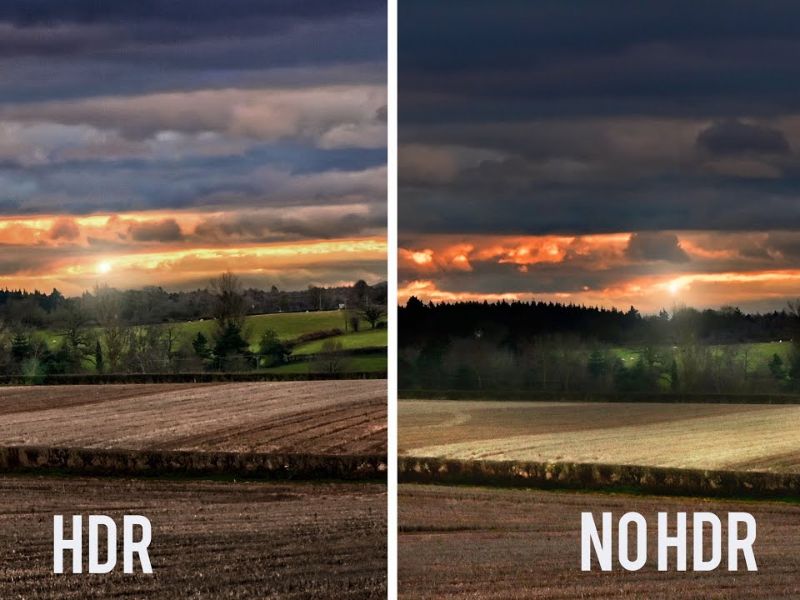
Topaz Labs is introducing two new image enhancement models: Wonder 4 and Image HDR.
Wonder 4 is designed to improve image quality through features such as:
- Image upscaling
- Noise reduction
- Deblurring
- Sharpening
Image HDR focuses on transforming standard images into HDR visuals with improved brightness and richer detail.
These tools could be useful for photographers, designers, and professionals who need to improve the quality of their images.
What Do These New Creative Tools Mean for Professionals?
The latest developments show how quickly creative software is changing.
Instead of focusing only on generating images or videos, Adobe is working toward AI-assisted workflows that can handle multiple tasks within professional applications.
The addition of local MCP integrations is particularly interesting because it could give users more freedom to choose which AI assistants they want to use with their creative tools.
For designers, this could mean less time spent repeating tasks. Video editors may benefit from improved color grading and object removal features, while photographers can use new tools to refine lighting and image quality.
However, AI features still need human direction and review. Creative decisions, visual consistency, and final editing remain important parts of producing professional work.
When Will the New Features Be Available?
Not every feature announced at Adobe MAX 2026 has the same release status.
Some Creative Cloud improvements are generally available, while others are still in beta or private beta.
The local MCP integrations are planned for private beta in early 2027. Firefly Design and Firefly Graph are in beta, while Firefly Builder is in private beta.
The AI Assistants powered by Creative Agent are also in beta across supported desktop applications.
Users should check the official Adobe announcements for the latest availability and access information.
Final Thoughts
Adobe is making a major move toward AI-powered creative workflows with its latest announcements. From new Photoshop editing tools and Premiere Pro improvements to Firefly’s expanding capabilities, the company is giving professionals more ways to work with artificial intelligence.
The introduction of local MCP integrations could be especially important because it opens the door for third-party AI assistants to work directly with creative applications.
These Adobe AI updates 2026 could influence how designers, photographers, and video editors approach their everyday projects as more features become available.
Who Can Benefit Most From Adobe’s New AI Features?
Adobe’s latest creative tools are designed for different types of users, from beginners to experienced professionals.
- Graphic Designers: Photoshop and Illustrator improvements can help designers edit images, explore new styles, and complete repetitive tasks more easily.
- Video Editors: Premiere Pro’s new tools can help with color grading, object removal, and managing complex video projects.
- Photographers: Lightroom’s editing features and image enhancement tools can make photo editing more convenient.
- Content Creators: Firefly’s design and video capabilities can help creators develop visual content for websites, social media, and other digital platforms.
- AI Developers: Local MCP integrations offer an opportunity to connect AI assistants with professional creative applications.
However, the best tools depend on each user’s needs, software access, and experience. Some features are still in beta or private beta, so users should check availability before planning their workflows.